Before you begin
Sign in to the correct organization and make sure this product is enabled. Creation and administration require the appropriate team role. Screens may differ with your language and permissions.
Choose an active person and campus with staff access to both Volunteers and People. Person and campus stay fixed after creation. Recorded checklist progress is not a credential verification or permission to serve.
Church owners and administrators add physical, online, or temporary campuses in Settings → Campuses. In Team & permissions, open Campus & product permissions to set each person’s campus, role, and products. A campus administrator manages records; church settings remain with church administrators and owners.
Open Volunteers
Volunteers is available to authorized staff when selected for their church. Open the correct church and Volunteers. Staff need access to both Volunteers and the linked People record at the profile campus. Companies can group churches, but a company role does not grant access to church records.
Select an active person and campus
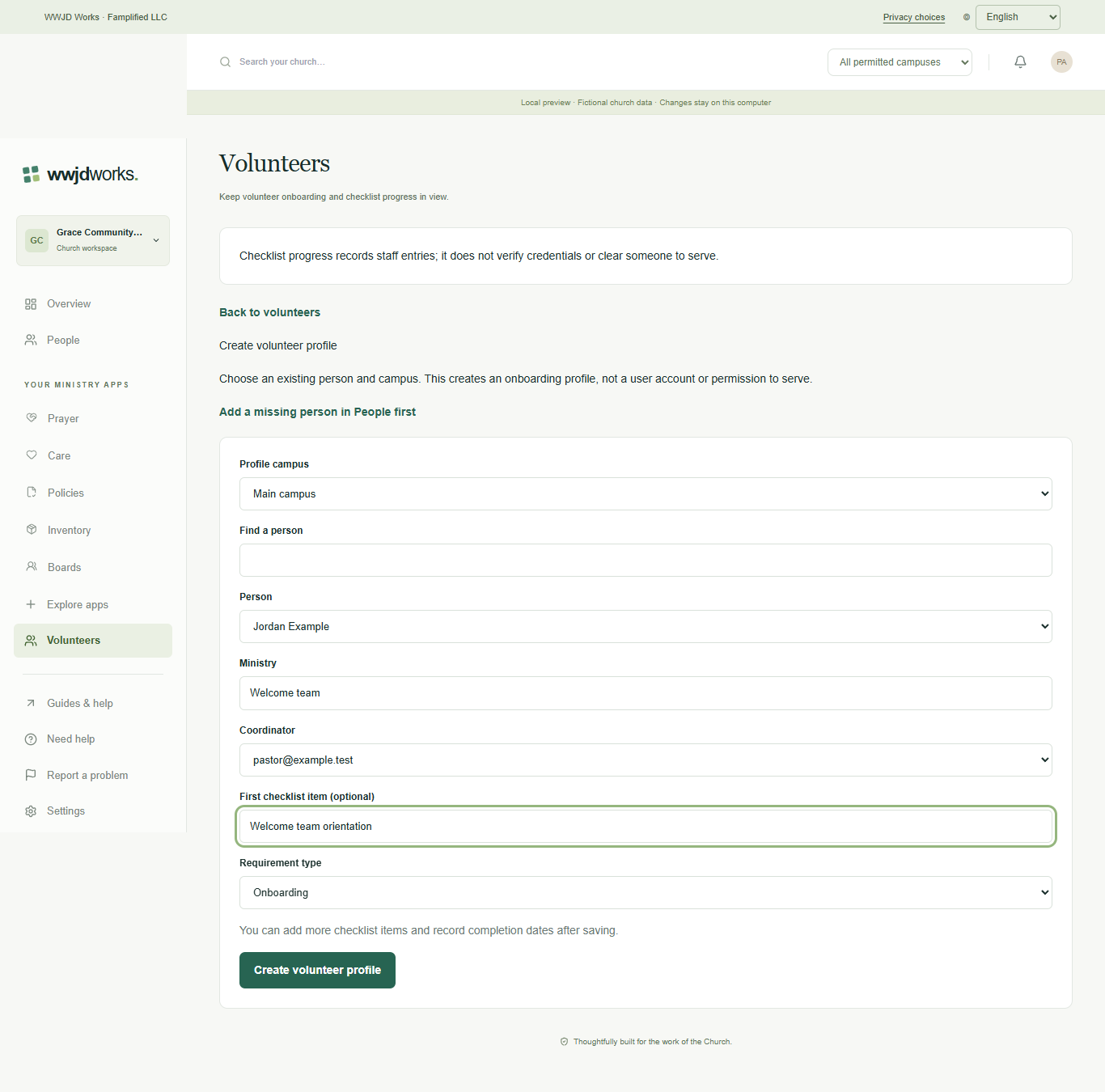
Choose Create volunteer profile. Select the profile campus, search People and choose an active person associated with that campus. Add a missing person in People first. Enter the ministry and optionally a coordinator with current access. Changing campus or search clears the person selection. A profile does not create an account or grant permission to serve.
Create and review the checklist
Optionally enter a first checklist item and its type, then create the profile. It starts in onboarding. Open Edit volunteer profile to add further items and record completion or expiration dates. The person and campus remain fixed. Each person has one profile per campus, including archived profiles. Saving sends no email and does not change People or communication preferences.
Watch tutorial — Volunteers
Create a volunteer onboarding profile
Silent walkthrough with captions in English, Spanish, and Brazilian Portuguese. The example workspace is fictional.
Written walkthrough and transcript
- Open Volunteers
Volunteers is available to authorized staff when selected for their church. Open the correct church and Volunteers. Staff need access to both Volunteers and the linked People record at the profile campus. Companies can group churches, but a company role does not grant access to church records.
- Select an active person and campus
Choose Create volunteer profile. Select the profile campus, search People and choose an active person associated with that campus. Add a missing person in People first. Enter the ministry and optionally a coordinator with current access. Changing campus or search clears the person selection. A profile does not create an account or grant permission to serve.
- Create and review the checklist
Optionally enter a first checklist item and its type, then create the profile. It starts in onboarding. Open Edit volunteer profile to add further items and record completion or expiration dates. The person and campus remain fixed. Each person has one profile per campus, including archived profiles. Saving sends no email and does not change People or communication preferences.
If something looks different
Missing actions usually depend on your role, the record’s visibility or status, or whether the product is enabled. Ask your organization administrator before creating duplicate records or changing access.